


CloudAssist – Staging

Zero Trust Strategy

Deploy least privileged access across your tenant and adopt a protective approach of always authenticating before granting access to sensitive resources.

Shield Icon Cyber Security, Hi-Tech digital display holographic information, Digital cyberspace, Technology digital data connection,  Future background concept.

Guiding Principles

The core tenets to ensure a successful zero trust strategy across your organisation.

011 finger print CloudAssist - Staging

Verify explicitly

Always authenticate and authorize based on all available data points, including user identity, location, device health, service or workload, data classification.

021 protection CloudAssist - Staging

Use least privileged access

Limit user access with Just-In-Time and Just-Enough Access (JIT/JEA), risk-based adaptive policies, and data protection to protect both data and productivity.

002 alert CloudAssist - Staging

Assume breach

Segment access by network, user, devices. Verify end-to-end encryption for all. Use analytics to get visibility, drive threat detection, and improve defences.
011 finger print CloudAssist - Staging

Verify explicitly

Always authenticate and authorize based on all available data points, including user identity, location, device health, service or workload, data classification.

021 protection CloudAssist - Staging

Use least privileged access

Limit user access with Just-In-Time and Just-Enough Access (JIT/JEA), risk-based adaptive policies, and data protection to protect both data and productivity.

002 alert CloudAssist - Staging

Assume breach

Segment access by network, user, devices. Verify end-to-end encryption for all. Use analytics to get visibility, drive threat detection, and improve defences.
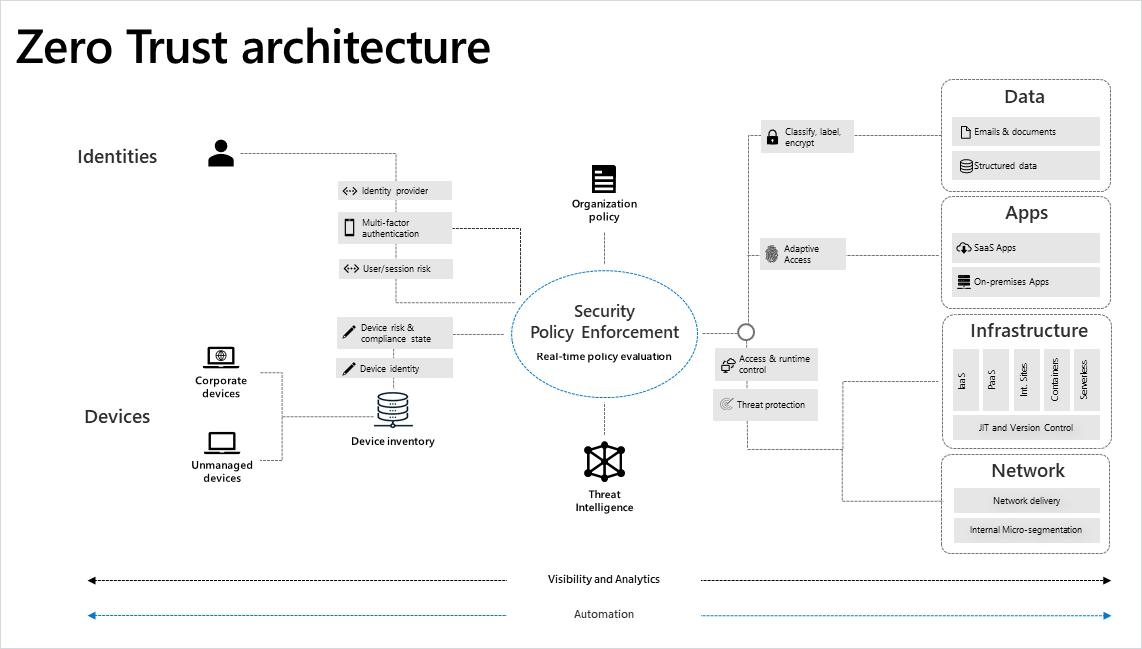
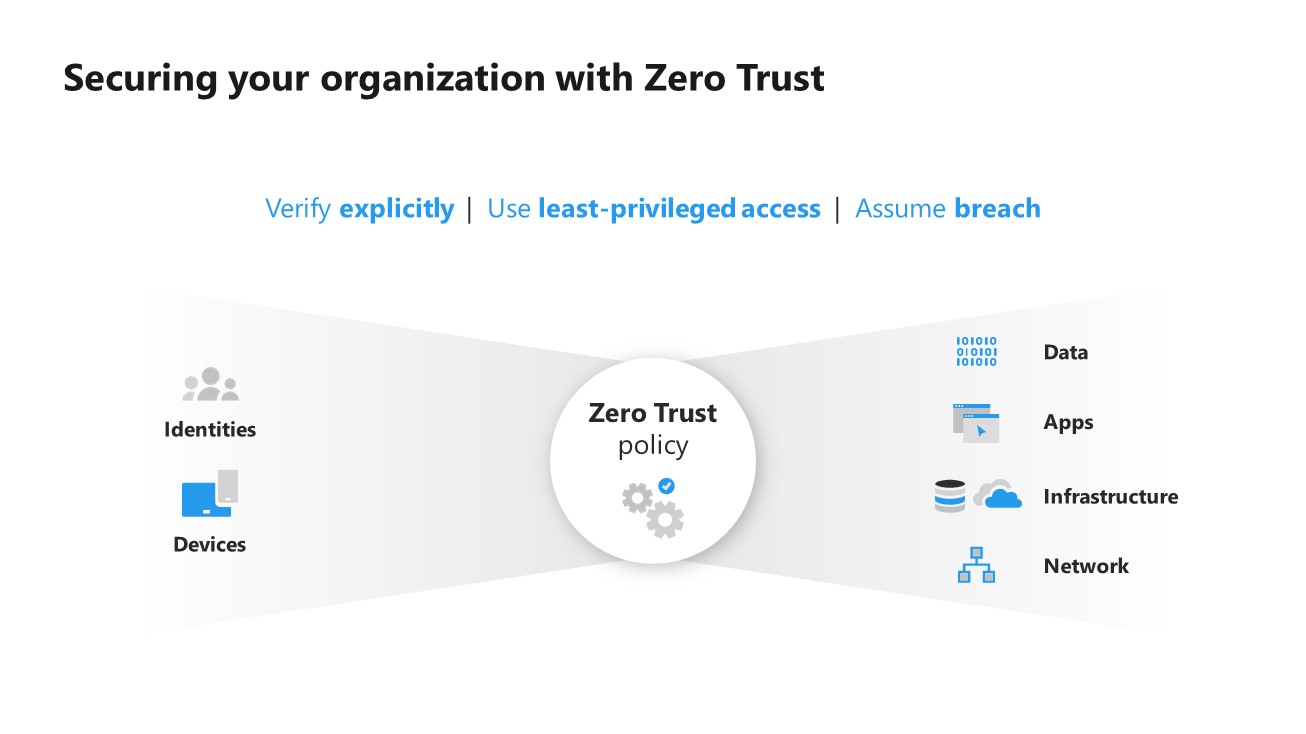
Graphical Overview of a Zero Trust Approach

Instead of believing everything inside the organization’s firewall is safe, the Zero Trust model assumes breach and a “never trust, always verify” access approach.

Every request, regardless of whether it originated internally or externally, is strongly authenticated, authorized, and inspected for anomalies.

In a Zero Trust framework, all users and devices inside and outside the organization perimeter seeking access are verified in real time.

Securing your organisation with a Zero Trust strategy. Overview slide showcasing the principles and benefits of a Zero Trust approach.

Evolution of Security Strategy

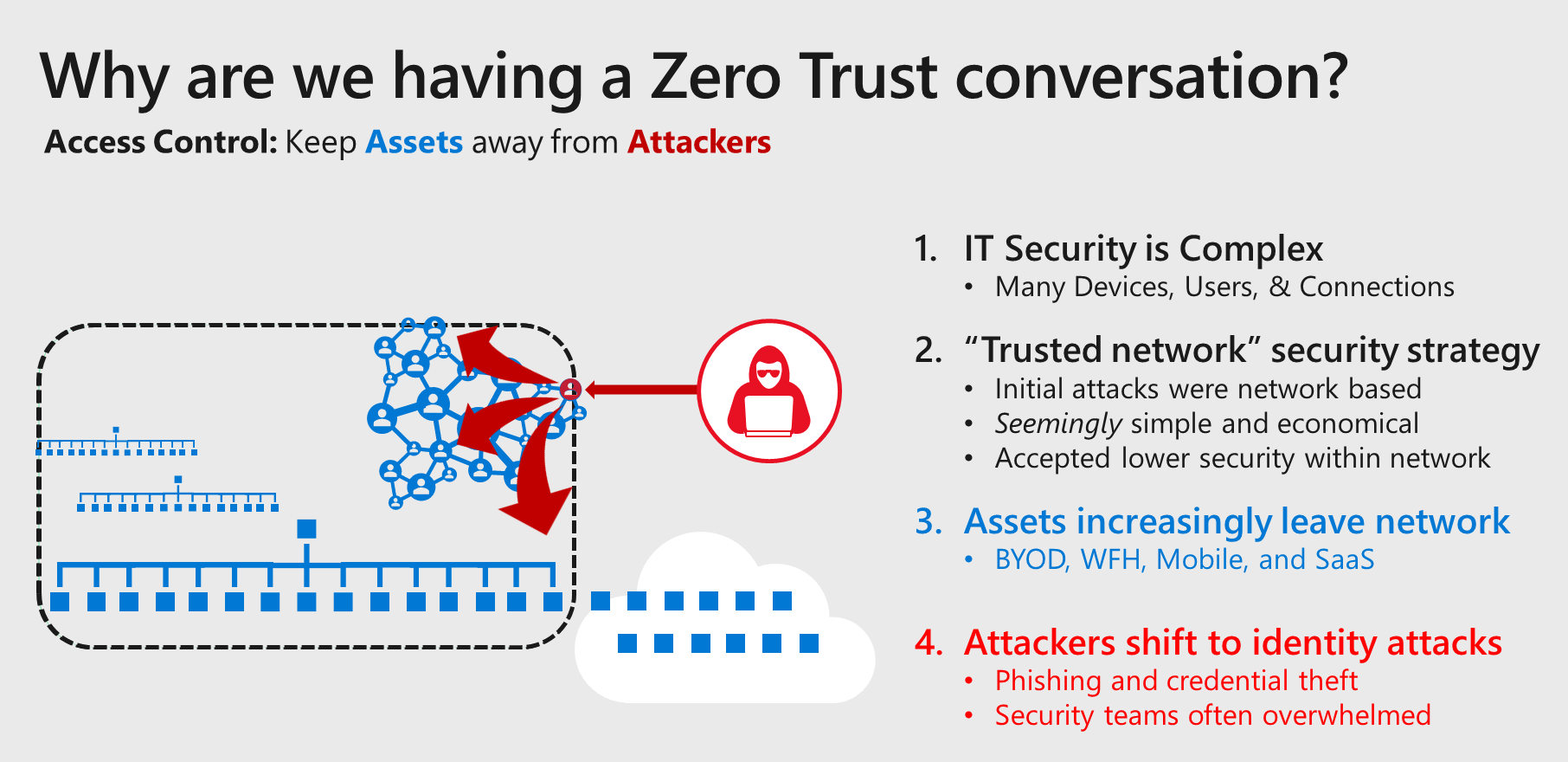
The central challenge of cybersecurity is that the IT environment we defend is highly complex, leading security departments (often with limited budgets/resources) to find efficient ways to mitigate risk of advanced, intelligent, and continuously evolving attackers.
Zero Trust strategy what good looks like 1 CloudAssist - Staging

What Good Security Looks Like

Zero Trust is a model that will ultimately be infused throughout your enterprise and should inform virtually all access decisions and interactions between systems.
Zero Trust strategy what good looks like 4 CloudAssist - Staging

The key hallmarks of a good enterprise Zero Trust strategy include:

Continuously measure trust and risk—Ensure all users and devices attempting to access resources are validated as trustworthy enough to access the target resource (based on sensitivity of target resource). As technology becomes available to do it, you should also validate the trustworthiness of the target resources.

Enterprise-wide consistency—Ensure that you have a single Zero Trust policy engine to consistently apply your organizations policy to all of your resources (versus multiple engines whose configuration could diverge). Most organizations shouldn’t expect to cover all resources immediately but should invest in technology that can apply policy to all modern and legacy assets.

Enable productivity—For successful adoption and usage, ensure that the both security and business productivity goals are appropriately represented in the policy. Make sure to include all relevant business, IT, and security stakeholders in policy design and refine the policy as the needs of the organization and threat landscape evolve.

Maximize signal to increase cost of attack—The more measurements you include in a trust decision—which reflect good/normal behaviour—the more difficult/expensive it is for attackers to mimic legitimate sign-ins and activities, deterring or degrading an attacker’s ability to damage your organization.

Fail safe—The system operation should always stay in a safe state, even after a failed/incorrect decision (for example, preserve life/safety and business value via confidentiality, integrity, and availability assurances). Consider the possible and likely failures (for example, mobile device unavailable or biometrics unsuccessful) and design fall-backs to safely handle failures for both:

    • Security (for example, detection and response processes).
    • Productivity (remediation mechanisms via helpdesk/support systems).

Contain risk of attacker movement into smaller zones—This is particularly important when you’re reliant on legacy/static controls that cannot dynamically measure and enforce trustworthiness of inbound access attempts (for example, static network controls for legacy applications/servers/devices).

Ready to Transform Your Security Operations?

Take the next step towards intelligent security management. Apply for Microsoft FastTrack Services or book a consultation with our founder to discuss your SIEM strategy.

Scroll to Top